
After School DMA Parent Options
Find out about the three after-school DMA options available to parents, and choose the right level of device control for your child.
Choosing the Right Level of Device Control
During school hours, the Default Setting will apply.
After school hours, parents/guardians have a choice to continue with the Default Setting or opt for an Alternative Setting.
After-School DMA Parent Options provide parents with the flexibility in managing your child’s/ward’s use of PLD after school hours. The following table provides a brief summary of each After-School DMA Parent Option.
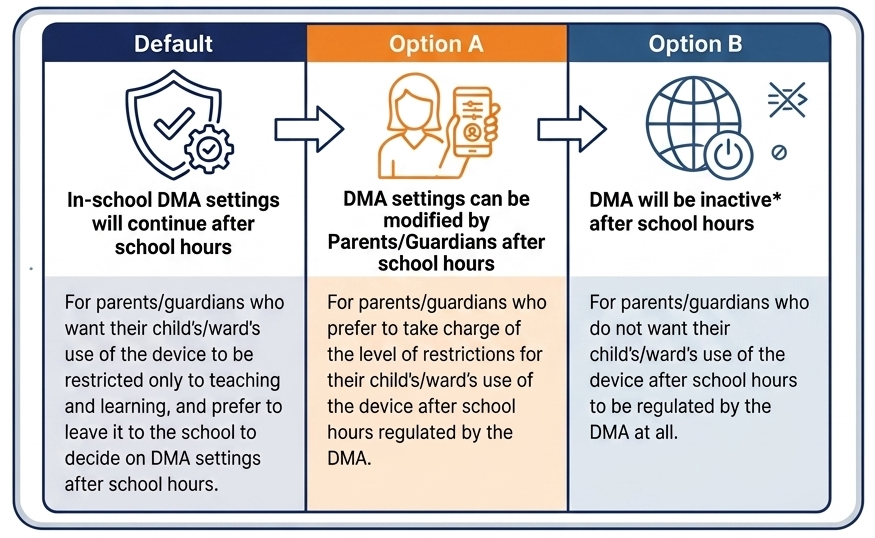
Parents/Guardians may wish to consider the following questions before deciding on which After-School DMA Option is best for their child/ward.
a. Child’s/Ward’s current device usage habits
How much time does my child/ward spend on his/her device?
How well can my child/ward regulate his/her device usage?
Does my child/ward become distracted during online learning?
b. Parental/Guardian involvement
Am I familiar with the various cyber threats that my child/ward might encounter?
Are there routines and conversations on the use of the internet at home?
How confident am I in ensuring my child’s/ward’s cyber wellness?
💡Having default school settings continue after school hours is the best option for parents/guardians who prefer not to, or do not feel ready to manage their child’s/ward’s device use on their own.
Understanding Device Management (DMA) Hours
Daily Schedule Breakdown
School Hours (6:30 AM to 3:30 PM)
School default settings apply automatically.
After-School Hours (3.30 PM to 10:00 PM)
Your chosen Parent Option (Option A, B, or Default) applies.
Sleep Hours (10:00 PM to 6:30 AM)
The iPad is automatically locked for rest (applies to Default and Option A).
💡 Important Note on Option A Sleep Hours
Under Option A, parents can only shorten or adjust screen time within the allocated window which is from 3.30 p.m. to 10 p.m.
For your child's well-being, the default sleep configuration cannot be extended past 10:00 PM.
Weekends, Public Holidays & School Holidays
Your selected After-School Option applies all day long until 10:00 PM.
School-hour restrictions do not apply on these days.
💡 Important Rule on Personal Apps
To help students focus, apps purchased using a Personal Apple Account are automatically hidden and inaccessible during school hours (6:30 AM to 3:30 PM).
No data is collected after school hours when the DMA is inactive.
For more detailed information on the different levels of restrictions, controls, and monitoring for each After-School DMA Parent Option, please refer to the Parent Engagement Decks .
DMA Parent Option Guides
Please download the relevant Parent Guide for the DMA Option you have chosen:
Request for change of DMA Option
[!IMPORTANT] Need to change your current setting?
Parents and guardians can request to change their choice of DMA options at any time. Please email either one of our ICT Managers below to initiate the change: